
海外怎么看电视?留学生&华人必看:突破地域限制的实用指南
Living abroad as a student or expat, have you ever picked up your phone to watch your favorite domestic drama, only to see a "this content is not available in your region" message? Or wanted to catch the CCTV Spring Festival Gala live but found the stream blocked? Even apps like Migu Video, which has the latest sports events, seem out of reach. This is the frustration of geo-restrictions—content platforms limit access based on your IP address due to copyright agreements. So, 海外怎么看电视 from China while overseas? This article will break down why these blocks happen, what features to look for in a return-to-China accelerator, and how to use one to seamlessly access CCTV live overseas, watch Migu Video abroad, and enjoy all your favorite domestic content without hassle.
Why Can’t You Watch Domestic TV Overseas?
Most Chinese content platforms—like iQIYI, Tencent Video, CCTV, and Migu—restrict access to users with Chinese IP addresses. This is because they hold broadcasting rights only for the Chinese market. When you’re overseas, your IP address shows your location, so the platform blocks your access. For example, 央视直播海外 is blocked because CCTV’s live broadcasts are licensed for mainland viewers only, and Migu Video’s sports content (like NBA or World Cup) has regional restrictions too. To get around this, you need an accelerator that changes your IP to a Chinese one, making the platform think you’re in China.
Key Features to Look for in a Return-to-China Accelerator
Not all accelerators are created equal. To ensure a smooth viewing experience, here are the features you should prioritize—ones that Tomato Accelerator excels at:
Global Nodes & Smart Optimal Routes
No matter where you are (US, Canada, Europe, Australia), you need an accelerator with nodes close to your location to minimize latency. Tomato has a wide network of global nodes, and its smart algorithm automatically recommends the fastest route for you. You don’t have to spend time testing different nodes; it picks the best one in seconds, so you can start watching immediately.
Multi-Platform & Multi-Device Support
As an overseas user, you might switch between your phone (Android/iOS) for on-the-go viewing and your laptop (Windows/Mac) for bigger screens. Tomato supports all these platforms, and even lets you use one account on multiple devices at the same time. So you can watch a drama on your phone while your family uses the laptop to catch 央视直播海外—no need for separate subscriptions.
Stable Unlimited Traffic & Specialized Lines
Buffering is the worst enemy of binge-watching. Tomato offers stable unlimited traffic, so you don’t have to worry about hitting a data cap mid-movie. It uses smart分流 (traffic splitting) to prioritize video and audio streams, so even if you’re browsing other sites, your show won’t lag. Plus, it has specialized回国影音 and game acceleration lines—for example, if you want to watch Migu Video’s NBA games, the dedicated line ensures every play is smooth. And each user gets an exclusive 100M bandwidth, so you don’t share speed with others.
Data Security & Encrypted专线传输
When using an accelerator, your online activity is exposed to the internet—so security is non-negotiable. Tomato uses advanced data encryption and专线传输 (dedicated line transmission) to protect your privacy. Your connection is secure, so no one can snoop on your browsing or streaming habits.
Real-Time After-Sales Support
What if you run into issues like the app not connecting or a platform still being blocked? Tomato has a professional technical team that provides real-time support. Whether it’s via chat or email, they’re there to solve your problems quickly—so you can get back to watching your favorite content without delay.
Step-by-Step Guide to Watching Domestic TV Overseas
Using Tomato Accelerator to access Chinese content is straightforward. Here’s how:
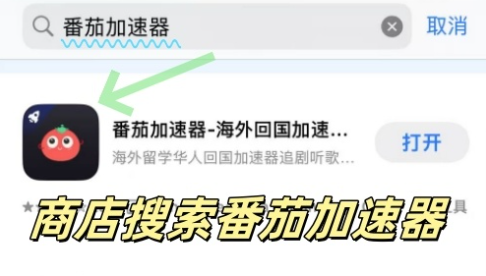
1. Download the Tomato app: Go to their official website and choose the version for your device (Android, iOS, Windows, Mac).
2. Sign up and subscribe: Create an account and pick a plan that fits your needs (monthly, quarterly, or annual).
3. Connect to the optimal route: Open the app—its smart algorithm will recommend the best line. Or, manually select a specialized line like "CCTV Live" or "Migu Video" for better performance.
4. Access your favorite content: Once connected, your IP is now Chinese. Open the CCTV app to watch 央视直播海外 (like News联播 or live sports), or launch Migu Video to stream the latest dramas or NBA games—no more geo-blocks.
5. Enjoy multi-device viewing: Switch between your phone and laptop as needed—Tomato’s multi-device support lets you watch on all your gadgets at the same time.
Common Questions & Troubleshooting
Q: Can I watch 央视直播海外 with Tomato?
A: Yes! Tomato has dedicated lines for CCTV live, so you can catch all live broadcasts (including the Spring Festival Gala) without buffering. Just select the "CCTV Live" line in the app.
Q: Why is Migu Video still buffering even with Tomato?
A: Try switching to the "Migu Video" specialized line. The smart分流 feature will prioritize your stream, reducing buffering. Also, check your local internet connection—if it’s slow, even the best accelerator can’t fix that.
Q: Is Tomato safe to use?
A: Absolutely. Tomato uses end-to-end encryption and dedicated lines to protect your data. Their team regularly updates the app to ensure security.
Final Thoughts

Going back to the question: 海外怎么看电视 from China when you’re overseas? The answer is simple—use a reliable return-to-China accelerator like Tomato. With its global nodes, multi-platform support, stable unlimited traffic, specialized lines, secure encryption, and real-time support, you can easily access 央视直播海外, watch Migu Video abroad, and enjoy all your favorite domestic content. Don’t let distance stop you from staying connected to home—try Tomato Accelerator today and bring the best of Chinese TV to your screen, no matter where you are.